Practice software for therapists

Less admin.
More focus on your clients.

Manage scheduling, intake, notes, and payments, with tools to help you set up, build, and grow your therapy practice.

Get updates when registration opens.

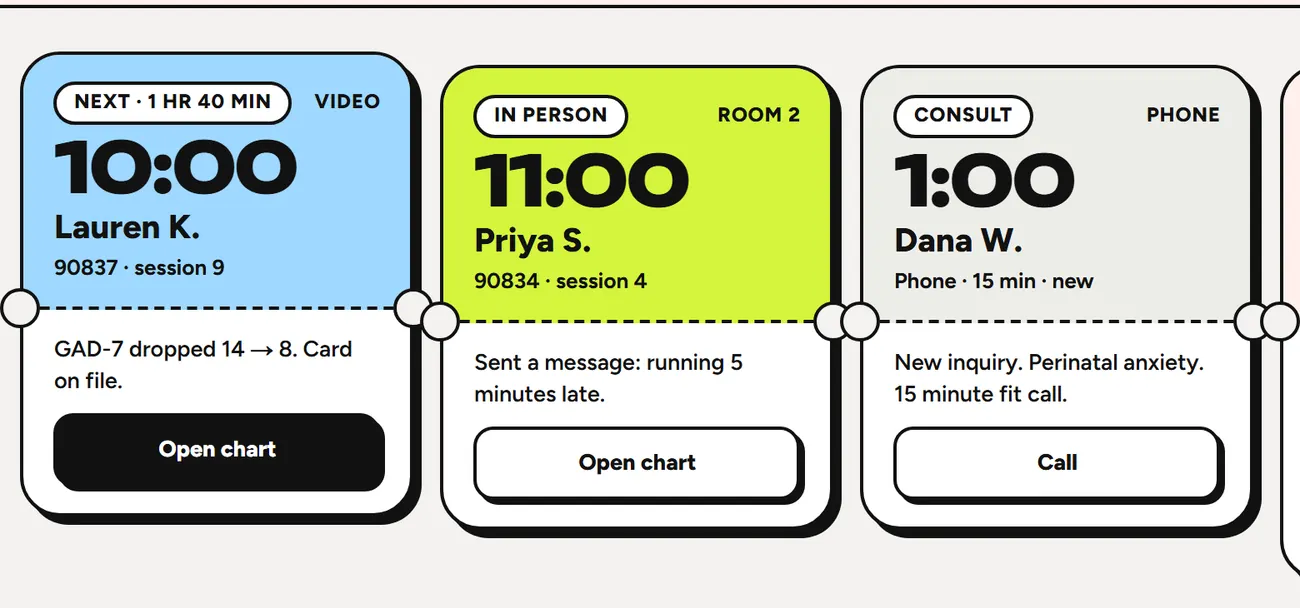
Your session lineupToday workspace
Product preview: color-coded session tickets bring appointment times, client context, and next steps into one view.
Each ticket pairs an appointment with the details you need before it starts.Explore the Today screen

01 / Everyday care

The tools for your
everyday practice.

From the first appointment to the next follow-up. Keep the work around each client together.

NoteSync

Optional, session by session

Start your note from the session.

NoteSync transcribes the sessions you choose and drafts a DAP, SOAP or BIRP progress note from the transcript. Use it with adult clients in one-on-one, couples and group sessions, in person or on video.

  1. Turn NoteSync on for the session.

    Choose it when you book or open a session. It stays off unless you turn it on.

  2. Everyone agrees.

    Each client agrees in their portal, and you agree too. Recording starts only when everyone has agreed.

  3. Review the draft and sign.

    Check the transcript, edit the draft, then sign the note yourself. Nothing is signed automatically.

Everyone on the session agrees first. Temporary audio and transcripts are deleted after one day and are not used to train models. Video images are not recorded. You review and sign every note.

How NoteSync handles privacy
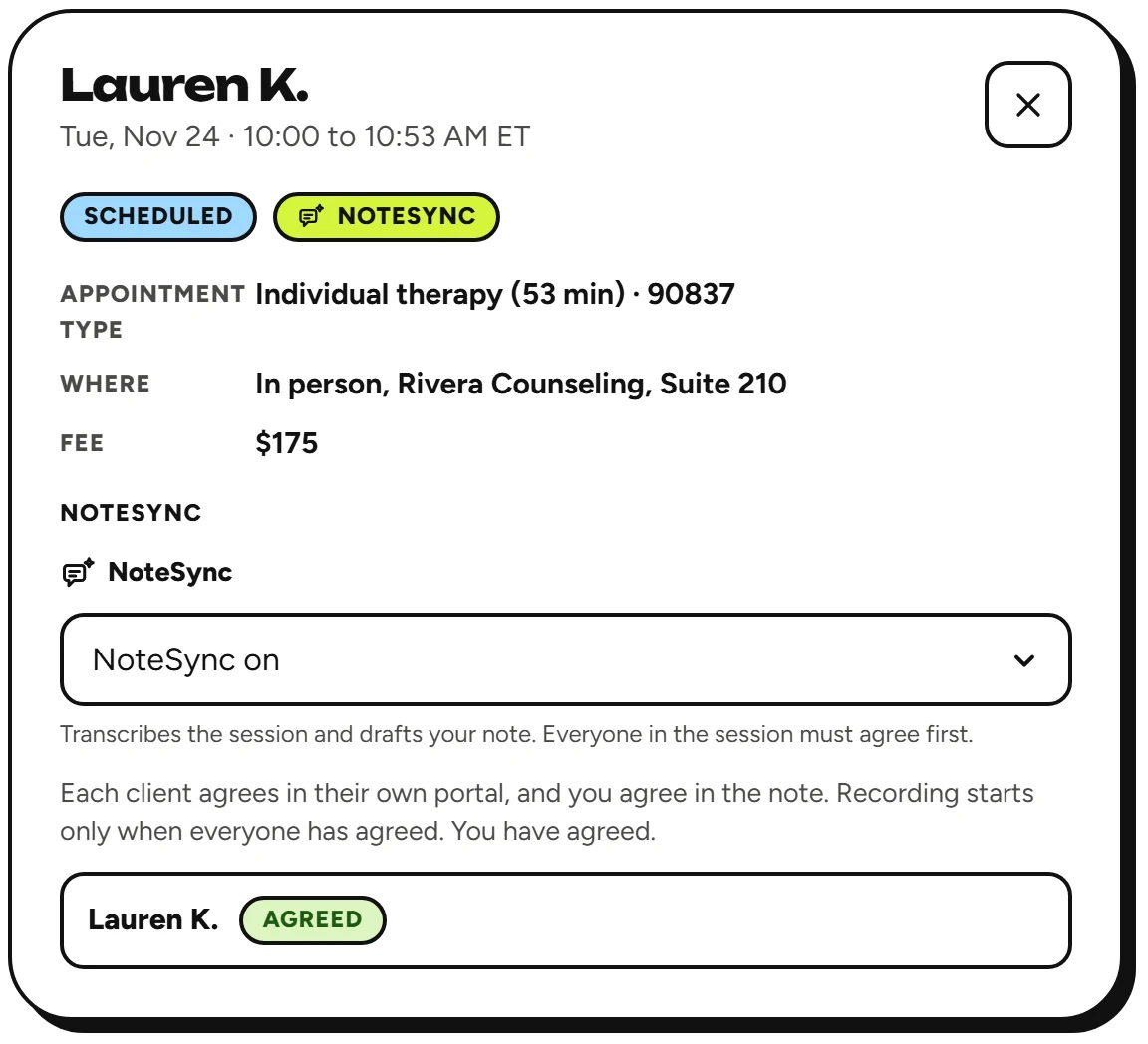
A session with NoteSync turned on. It explains that recording starts only when everyone has agreed, and the client is marked Agreed.
Each client’s answer shows on the session.

02 / Building your practice

Build the practice
you want.

Get help with the business decisions, setup, and marketing that come with running a practice.

Start with your state & license

Make your next
step clearer.

Explore business-structure guidance, filing steps, and official resources for your state and license.

  • Business-structure options
  • Formation, EIN, and NPI steps
  • Source links and review dates
Find your state guide

General information. Confirm legal and tax decisions with an attorney or accountant.

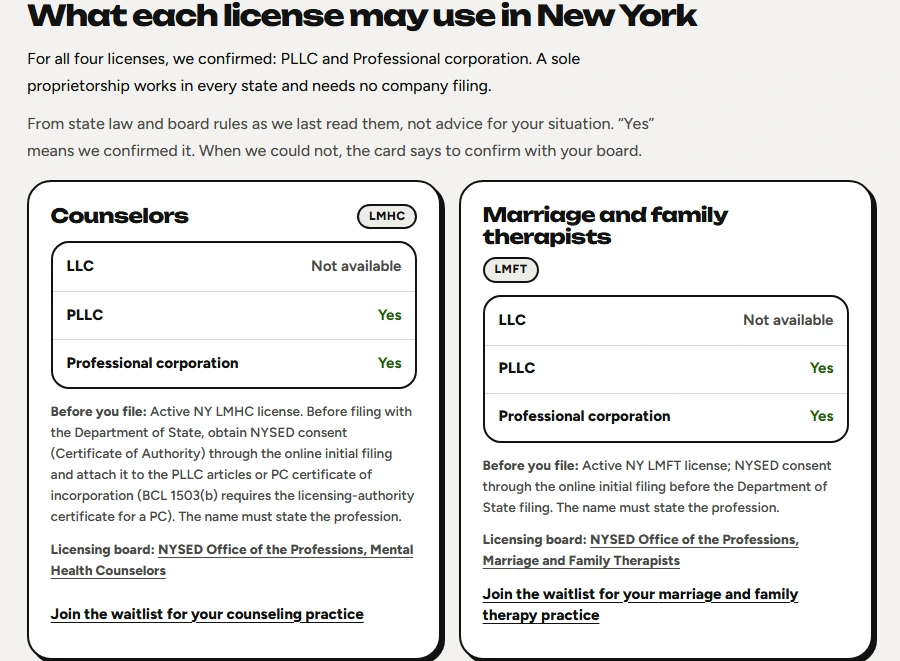
New York guide comparing business structures for counselors and marriage and family therapists, with filing prerequisites and board links.
New York guide. Checked Oct 18, 2026.
Free planning tool

Fees & caseload planning

Compare payment-model estimates against your income goal and available hours.

Explore the calculator
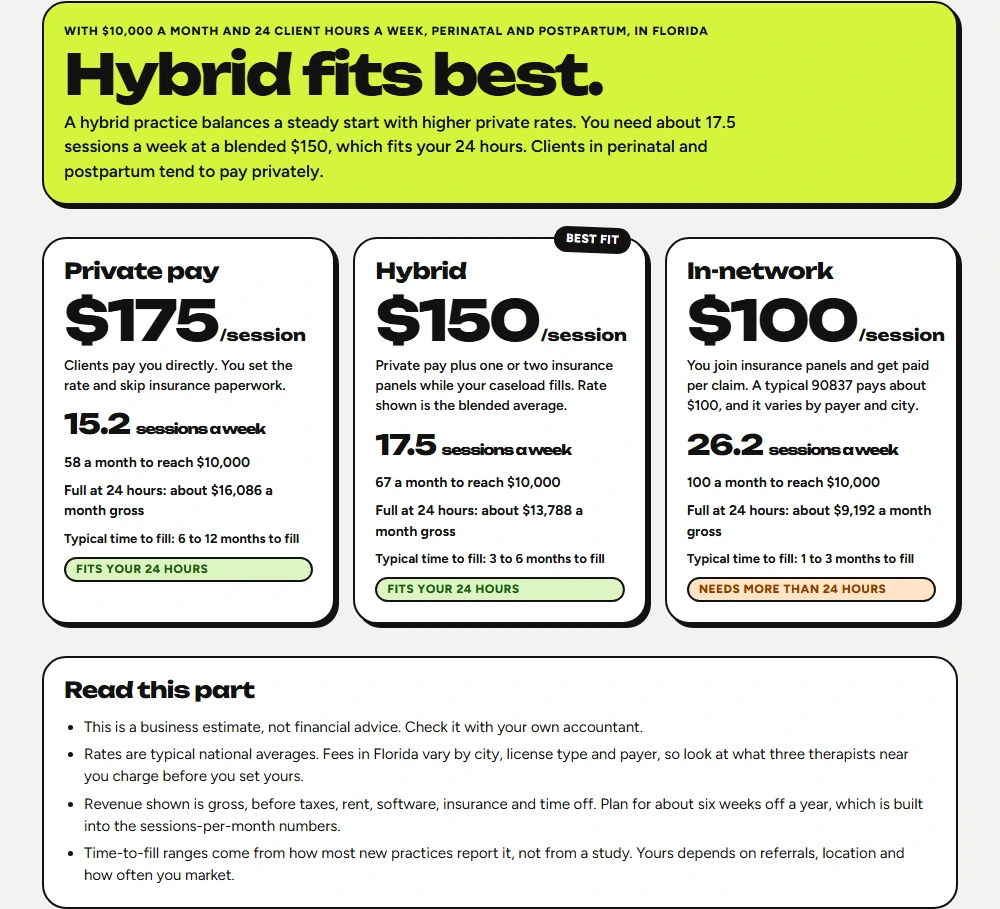
Payment-model calculator comparing estimated sessions, rates, and revenue, with the inputs and estimate assumptions shown.
Illustrative estimates, with assumptions shown.
Planned Practice feature

Brand Studio

Define your specialty, ideal client, and practice voice. Build on the brand you already have.

Explore Brand Studio
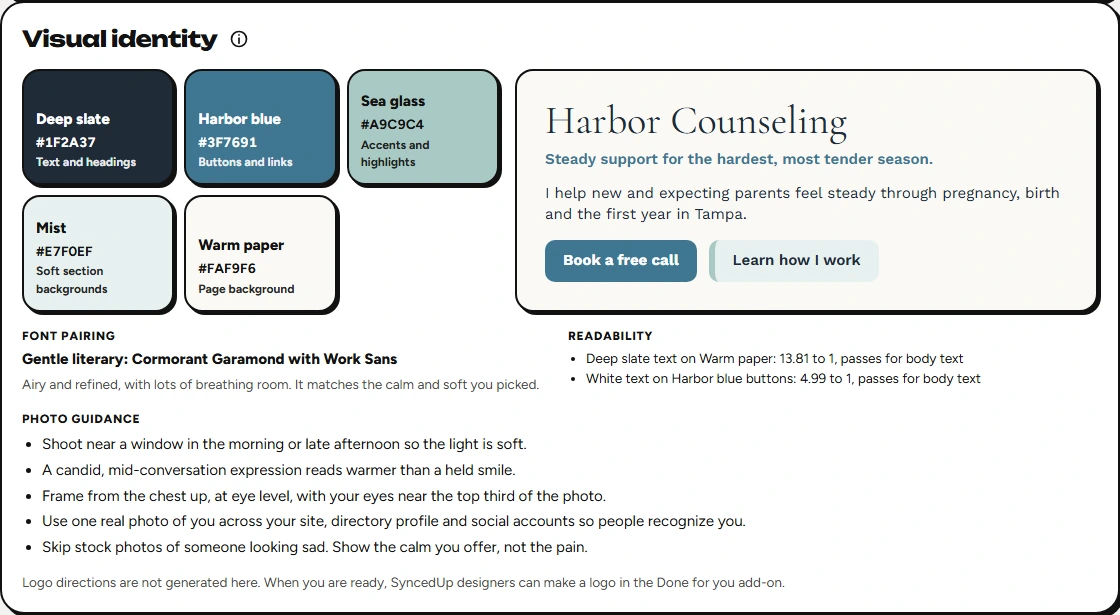
Brand Studio visual identity result with a practice name, color palette, typography, and logo direction.
Your ideas, refined into an editable brand kit.
Planned Practice feature

Practice website

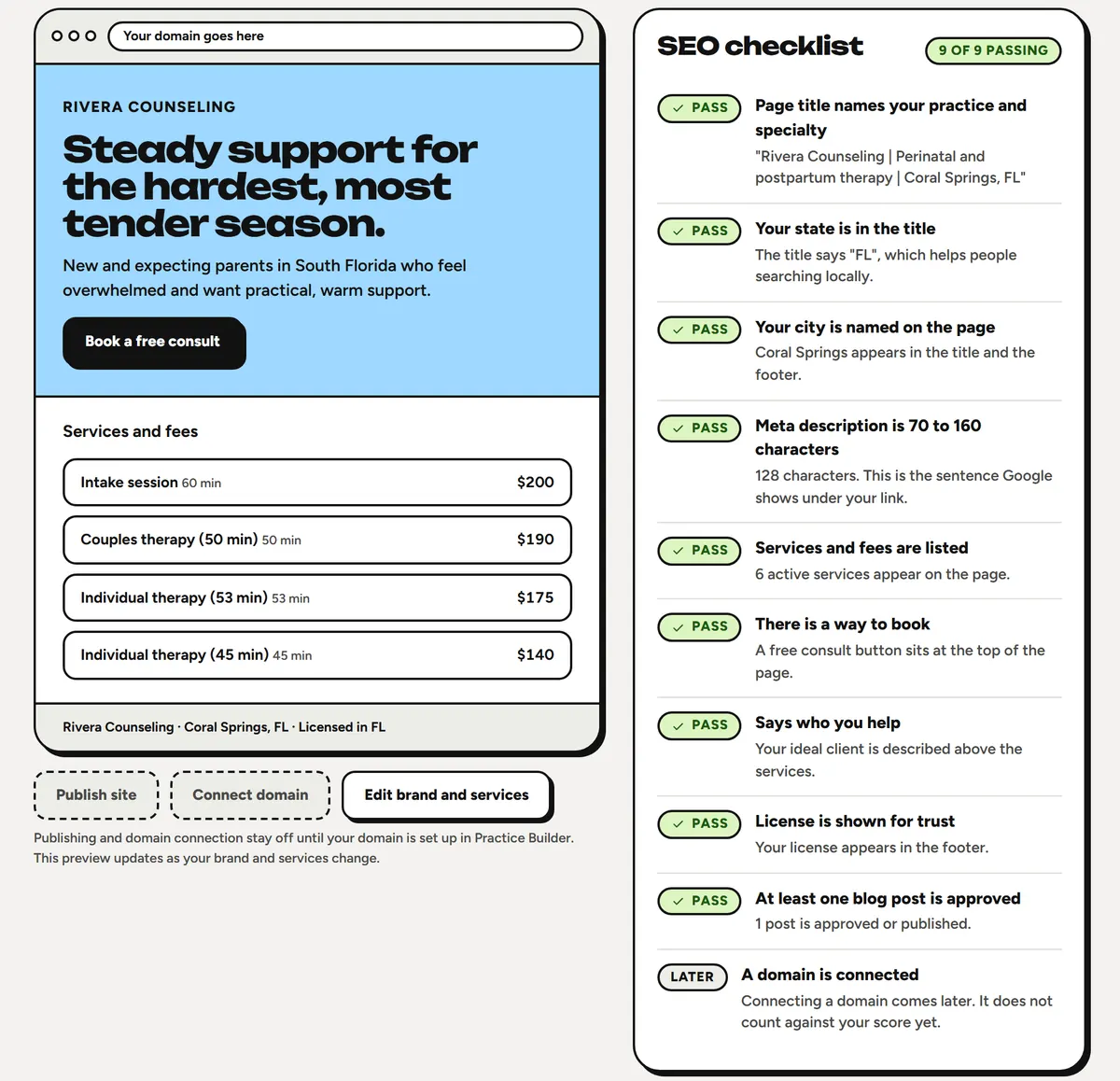
Bring your practice details into a website with consultation booking and search guidance.

Explore website tools
Practice website workspace with a site preview and SEO checklist.
Review your pages before you publish.
Planned Growth feature

Content Studio

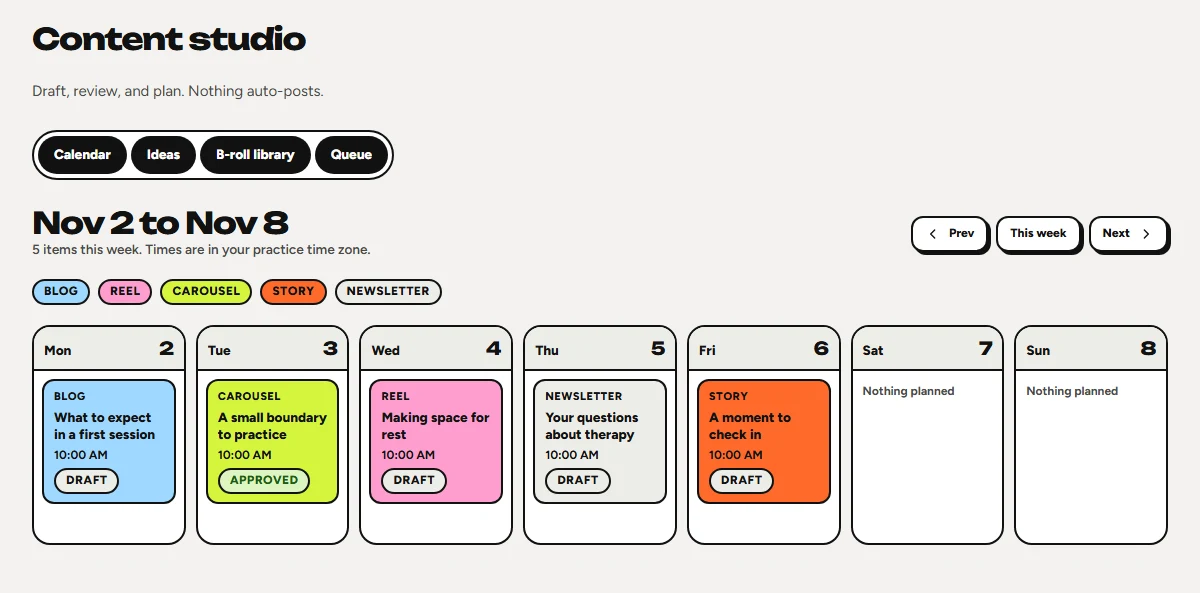
Draft and organize blog and social content around your practice’s voice.

Explore Content Studio
Content Studio calendar with blog, carousel, reel, newsletter, and story drafts planned across one week.
Plan and review your content. Nothing auto-posts.

Planned pricing

Compare launch plans.

Start

Scheduling, notes, and payments.

$39 / month

Growth

Content planning and priority support.

$129 / month

Planned founding member offer: $49/month.
Includes Practice features. Final availability and terms will be confirmed at launch.

Full pricing details

Pricing and availability may change before launch. Joining the waitlist does not reserve a plan or price.

Good to know

Questions before you join?

Still have a question?

Talk to our team
Can my group practice use it?

Assign chart access by role and give administrative staff a workspace for daily operations. See team permissions

Can I sign up today?

New registrations are paused while we prepare for launch. You can join the waitlist for updates when registration opens. Joining does not create an account, require payment, or reserve a plan, price, or place.

Can I switch from another system?

Yes. Upload a CSV or Excel (.xlsx) client list and original PDFs or images, including supported files inside a ZIP. Review column matches, possible duplicates, and document-to-client matches before saving. Appointments, financial transactions, and portal access need separate setup. Uploads support up to 25 MB per selection and 3 MB per document. Keep your original export and any records you are required to retain.

What about insurance billing?

The product is built first around self-pay workflows, card payments, superbills, and Good Faith Estimates. Insurance eligibility and claims tools are in development. They should not be treated as fully available.

How does AI fit into the workflow?

The assistant supports the clinician with drafts and summaries, including notes from typed shorthand. With NoteSync, a session that everyone agrees to record is transcribed and drafted into a progress note. In couples and group sessions, each client’s draft is about that client only, with other clients’ names replaced, and only the therapist can open the transcript. You review, edit, and sign the final note. Review the privacy and security information before using any AI workflow with client information. See how NoteSync works

How are client records protected?

A business associate agreement is part of setup. Signed notes are locked, and addenda preserve later changes. Review privacy and security

Built around your practice.

Know when
registration opens.

Join the SyncedUp Therapy waitlist to hear when you can sign up.

Join the waitlist

No account or payment required.